
4 in 5 B2B Websites Are Losing Buyers Before They Even Ask for a Quote, Digital Silk Study Finds
More than 4 in 5 B2B websites studied had at least one barrier keeping buyers from requesting a quote, booking a demo or contacting sales.


-
Poor site structure was the most common B2B conversion barrier, found on 43.5% of the B2B websites studied.
-
Unclear messaging ranked second at 41.3% as buyers couldn’t quickly tell what the company sells, who it serves or how it differs from competitors.
-
82.6% of the B2B websites studied had at least one of five conversion barriers.
-
34.8% had no defined conversion path from key pages to a quote, demo or sales conversation.
-
21.7% had a credibility gap that made the company look smaller or less established than it is.
NEW YORK, NY — Poor site structure and unclear messaging are the most common conversion barriers on B2B websites, according to a new study by Digital Silk. Poor site structure appeared on 43.5% of the B2B websites studied and unclear messaging on 41.3%. Overall, more than four in five (82.6%) had at least one barrier keeping buyers from becoming leads.
The study looked at 46 B2B client websites before Digital Silk redesigned them, along with performance data after launch. The companies include manufacturers, software providers, financial services firms, contractors and professional services firms.
Below are the five most common conversion barriers, how each one showed up and how B2B companies can assess their own websites.
Table of Contents
The 5 Most Common B2B Conversion Barriers
1. Poor Site Structure (43.5%)
Site structure, also called information architecture, is how a website’s content is organized and labeled.
For the 91% of businesses that say their website is their top marketing channel, structure determines whether that channel turns visits into inquiries.
When it doesn’t match how buyers search, they leave before finding what they need.
One truck dealer with 32 branches had no individual location pages, and its vehicle pages had no contact option. One insurance software company showed more than 20 solutions in its main navigation. One commercial contractor buried the service and maintenance department that brought in its repeat business.
How to assess it: Ask someone outside the company to find a specific service, specification or location. If it takes more than three clicks, buyers are likely leaving.
How you can fix this:
- Organize navigation by how buyers search, such as by service, industry or location
- Create a dedicated page for every branch and core service
- Cut the main menu to a handful of top-level categories
- Give repeat-revenue services like maintenance a place in the main navigation
- Run a card sorting test with customers before finalizing the menu
2. Unclear Messaging (41.3%)
These websites led with features, technical specifications or internal terminology instead of the business problem the product solves.
At one industrial equipment manufacturer, buyers couldn’t tell which of two product lines fit their application. One infrastructure technology company presented its software platform as a hardware catalog, which hid its main differentiator.
How to assess it: Show the homepage to someone unfamiliar with the company for 10 seconds. Can they say what you sell, who it’s for and why it’s different?
How you can fix this:
- Open the homepage with the problem you solve and who you solve it for
- Swap technical or unclear jargon for the terms buyers type into search engines
- Add a product comparison or selector for lines that overlap
- Move technical specifications below use cases on product pages
- State your main differentiator in the first headline buyers see
3. No Defined Conversion Path (34.8%)
These websites relied on generic “Learn more” links and a single contact form, with no clear next step matched to each page.
At one flooring contractor, visits averaged 51 seconds and buyers had no way to request a quote. After one insurance software company added a dedicated demo landing page and replaced its generic forms, monthly lead form submissions rose 135% within five months. At one AI software company, rebuilt conversion paths came with 48% more leads and a 50% lower cost per acquisition.
How to assess it: From every product and service page, check whether a buyer can request a quote, demo or consultation in one click, with a call to action specific to that page.
How you can fix this:
- Match each page’s call to action to buyer intent, such as quotes on service pages and demos on product pages
- Replace “Learn more” links with specific actions like “Request a quote”
- Set up dedicated landing pages for high-value offers
- Trim forms down to the fields your sales team actually uses
- Track form submissions by page to spot where buyers drop off
4. A Credibility Gap (21.7%)
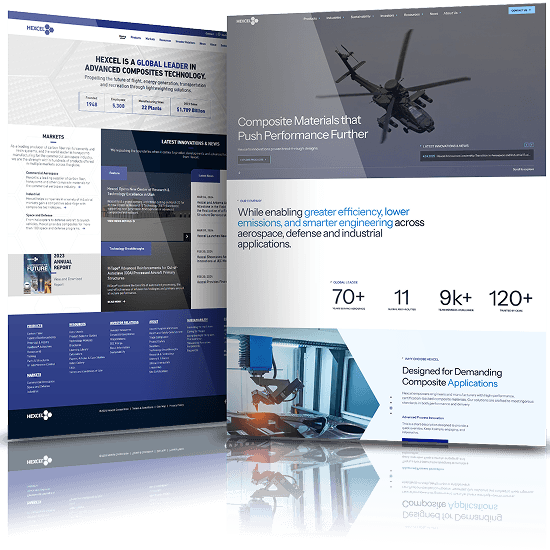
These websites made the company look smaller, newer or less established than it is, with few brand trust data signals such as project portfolios, client names, certifications or company scale.
At one commercial electrical contractor with $100 million in revenue, general contractors read the website as a small operation, and the company received fewer invitations to bid.
Brand trust is the main reason vendor relationships deepen for 52% of B2B buyers, which often starts forming on a company’s website before any sales conversation.
Buyers look for proof that a company can deliver at their scale, such as completed projects, recognizable clients and industry certifications. Without it, they have little reason to trust the company and tend to shortlist competitors whose track record is easier to verify.
How to assess it: Check whether the homepage shows scale and proof, such as years in business, locations, completed projects, notable clients or industry certifications.
How you can fix this:
- Show scale figures on the homepage, such as years in business, locations and completed projects
- Publish case studies with project size, scope and measurable results
- Place client logos and certifications near calls to action
- Add testimonials from named clients with their titles and companies
- Keep project portfolios current so recent work appears first
5. No Audience-Specific Journeys (19.6%)
Buyers, investors, partners and job candidates were all sent through the same user journey and messaging. This also attracted leads that didn’t fit.
At one community lender, borrowers and investors shared a single path, and the lending criteria were buried. Staff spent hours screening out loan requests the lender couldn’t fund.
How to assess it: List each audience your website serves. Check that each one has a dedicated entry point from the main menu, and that qualifying criteria appear before the contact form.
How you can fix this:
- Give each audience its own entry point in the main menu
- Write separate messaging and calls to action for buyers, investors and candidates
- List qualifying criteria like project size, location or loan type before any form
- Add form fields that route inquiries to the right team
- Move careers and investor content out of the buyer journey
“B2B buyers arrive with two questions: Can this company solve my problem, and how do I start the conversation?” said Gabriel Shaoolian, Founder and CEO of Digital Silk.
“When a website is hard to navigate or doesn’t explain the offering clearly, buyers can’t answer the first question, so they never get to the second. Many B2B companies try to fix low lead volume by driving more traffic, when the bigger loss happens after visitors arrive,” Shaoolian added.
Learn how Digital Silk can help your business address website challenges with a custom web design strategy.
About Digital Silk
Digital Silk is an award-winning Web Design & Marketing Agency focused on growing brands online. With a team of seasoned experts, Digital Silk delivers experiences through strategic branding, custom web design and digital marketing services to help improve visibility and support engagement.
Media Contact
Jericka Orellano
PR Manager
[email protected]
Tell us about your business goals and let our experts give you a custom proposal
"*" indicates required fields