10 BigCommerce Theme Customization Tips To Optimize Your Store In 2026
BigCommerce theme customization gets easier with the right approach. Explore 10 tips to optimize your store's design, speed and conversions in 2026.


-
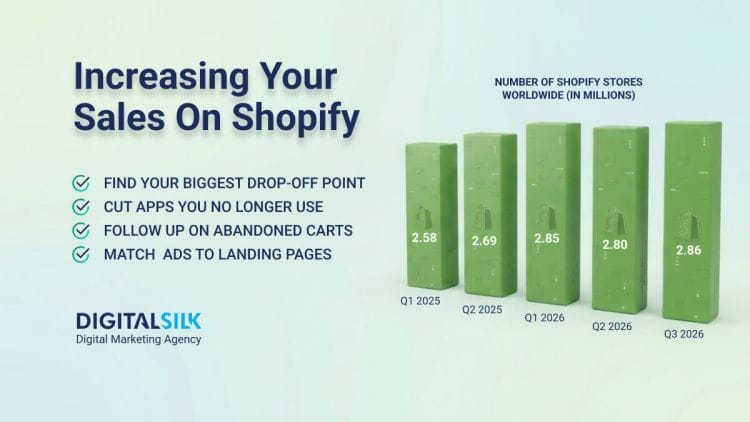
Fewer stores, more room: BigCommerce powered 37,140 live stores in Q2 2026, so the categories you sell in are less crowded than they were a year ago.
-
Configuration only takes you so far: Page Builder handles colors and banners, but custom templates, widgets and checkout work need a developer who knows Stencil.
-
Mobile product pages decide sales: If price and add-to-cart fall below the fold on a 390-pixel screen, that single fix outranks everything else on your list.
BigCommerce powered 37,140 live stores in the second quarter of 2026, a number that slipped a little from 2025 and tells you something useful about where the platform sits today.
Fewer stores mean fewer competitors crowding the categories you sell in, so merchants who put real work into their storefront have a wide opening to pull ahead of the ones running a stock theme with a logo dropped into the header.
Almost all of that opening lives in your theme, because the difference between a store that sells and one that gets browsed and abandoned usually comes down to how far someone pushed the theme past its factory settings.
In this post, we’ll explore 10 BigCommerce customization strategies that cover the no-code settings already sitting in your control panel, the template options underneath them and the habits that keep your changes intact a year from now.
10 Ways To Maximize Your BigCommerce Theme Customization
We picked these 10 steps based on our experience working with clients. We’ve ordered them from the first thing you should handle to the last.
1. Choose A Theme Whose Settings Already Cover Your Roadmap
Every hour you spend hand-coding a feature your theme could have shipped with is an hour you pay for twice, once now and again at the next upgrade. Read the theme details page in the marketplace against your plan for the next 12 to 18 months, not against how the demo looks.
Three things on that page tell you the most:
- The features list. Look for the specific capabilities you know you’ll want later, like a product comparison table, complex search filtering, quick add-to-cart or product videos.
- The style count. For instance, Cornerstone Light offers three styles, while Fortune Minimal has four. That count caps how many looks you can run from one theme.
- The developer. BigCommerce builds and maintains Cornerstone in the open on GitHub and it’s usually the first theme to support new platform features. Third-party themes vary a lot in how often they get updated, so ask the developer directly before you buy.
If your catalog is small to medium and image-led, Fortune’s masonry grid saves you a layout build. If you expect to grow past a few thousand SKUs, start on a theme that already handles deep navigation.
2. Duplicate The Theme And Work On The Copy
Editing your live theme is how stores end up with a broken cart on a Friday afternoon. Add a second copy of the theme in My Themes, apply the copy and leave your original alone as a rollback point.
For anything beyond simple styling, install Stencil CLI and run stencil start. That spins up a local server that pulls real data from your live store, so you can preview changes against your actual products and content before anything goes public.
When you’re happy, stencil push -a uploads the theme and activates it, and adding -d clears the oldest theme automatically if you’ve hit your theme slot limit.
One more thing worth knowing: BigCommerce doesn’t sync two open Page Builder sessions on the same storefront. If a designer and a marketer both have it open, the last save wins and the other person’s work disappears. Agree on who has the editor before anyone opens it.
3. Exhaust Page Builder’s Theme Styles Before You Open A Code Editor
Theme Styles reads from two files in your theme, schema.json and config.json. The schema declares which settings a merchant can edit and what values they can pick, and the config holds the default for each of those settings.
When someone saves a change in the panel, BigCommerce rewrites the config to record the new default.
That matters for two reasons. First, plenty of what people pay developers to hard-code, like button colors, heading fonts, logo dimensions, product counts per panel and carousel behavior, is already exposed in the panel.
For example, Vault Natural goes further than most free themes here, with color pickers for nearly every element and homepage image and text banners you can add without touching a template.

Second, if you’re adding your own controls, every key you create in schema.json has to have a matching key in config.json or the control never appears in the panel. Stick to your chosen color scheme, font, select and checkbox control types, since those render reliably. Text areas, radio buttons and image fields often don’t show up at all.
4. Rebuild Navigation Around The Way People Search Your Catalog
Default navigation mirrors your category tree, and your category tree usually mirrors how your warehouse thinks, not how your customers shop. Pull your top 50 internal site searches, then rebuild the header so those terms are reachable in one or two clicks.
How to handle it by catalog size:
- Under 500 SKUs: cap top-level items at six, keep the search field visible in the header rather than behind an icon and skip the mega menu.
- 500 to 5,000 SKUs: a mega menu earns its space. Supermarket Blue pairs mega navigation with a multi-tiered sidebar menu and complex search filtering, which suits wholesale and marketplace-style catalogs.
- Deep catalogs on mobile: Roots Original has a sticky header that shrinks as people scroll and a filter display that works on a phone, which is where most abandonment happens.
Turn on faceted search if your plan includes it, then rename your filter labels to match customer language. “Sleeve length” beats “attribute 3” every time.
5. Reorganize The Top Of Your Product Page
Look at your product page on a 390-pixel-wide phone screen. If price and add-to-cart appear below the fold, that’s your highest-value fix in this whole list.
Work through it in this order. Move the price, stock status and the add-to-cart button into the first screen on mobile. Add wallet buttons to the product page so returning shoppers can pay without typing an address, which BigCommerce supports directly in Stencil themes alongside PayPal smart buttons.
Turn on advanced quick view for category pages so people can check a size chart without losing their place in the grid. Then add product videos to your 20 best sellers, since video answers the questions that generate your support tickets.
Keep every product image at the same aspect ratio while you’re in there. Mismatched dimensions shift the layout as images load, which hurts both the experience and your Core Web Vitals score. For carousel slides, Cornerstone recommends roughly 1,400 x 600 or 1,400 x 800 pixels with consistent sizing across all slides.
6. Move Repeating Sections Into Widgets And Global Regions
Anything a marketer will want to change monthly belongs in a widget, not in a template. Promo bars, shipping cutoff notices, size guides, trust badges and seasonal banners all qualify.
Widgets drag into theme regions from Page Builder, and Widget Builder lets your developer create custom ones with their own settings panel.
Global regions are the part people miss: place a widget in a global region and it renders on every page that includes that region, so a single edit updates your whole site instead of 40 pages one at a time. Widget versioning also lets you update a widget everywhere it appears without hunting down each instance.
The payoff shows up in your invoices. Content updates stop routing through a developer and your promo blocks survive a theme upgrade because they never lived inside a template file.

7. Create Custom Templates For Your Deepest Categories
Running one category template across a 400-SKU category and a six-SKU category serves neither of them well. Stencil lets you create custom templates and assign them to individual categories, brands, products and web pages from the control panel.
Build two or three and assign them where they fit:
- Filter-heavy layout for your largest categories, with filters open by default and a higher product count per page.
- Editorial layout for small curated collections, with more copy, lifestyle imagery and fewer grid columns.
- Comparison layout for technical products, with a spec table above the grid.
You can also use dynamic template rendering to serve a different template based on page context, which keeps you from creating one file per category.
8. Build Separate Theme Variations For Separate Audiences
A Stencil theme can hold one to four variations, defined in config.json. Variations sit at the top of the Theme Styles panel, and each one saves its own settings, so you can run a wholesale look and a retail look from a single theme instead of maintaining two.
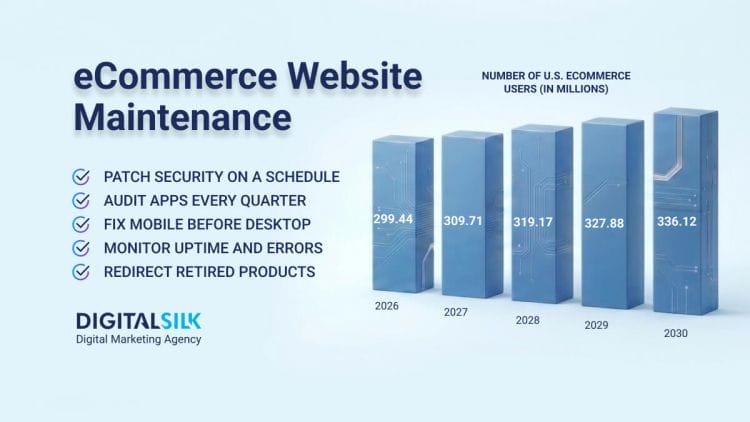
U.S. eCommerce is expected to rise steadily until at least 2028, with year-over-year growth of 8.5%, so most stores reading this will add a segment or a market inside that window. Plan your variation slots now.
If you’re on Multi-Storefront, you can assign a different theme or variation to each storefront channel and translate page regions per locale, which handles a B2B portal, a D2C site and a regional store without three separate builds.
One warning: you get four variation slots per theme. Removing a variation later means deleting keys from your config, which can break older versions of the theme, so don’t fill all four on a whim.
9. Run A Speed Check After Every Change
Customization adds weight, and weight costs sales. Run Lighthouse after every batch of changes and treat these three numbers as your pass-or-fail line:
- Largest Contentful Paint: 2.5 seconds or faster
- Interaction to Next Paint: 200 milliseconds or less
- Cumulative Layout Shift: 0.1 or less
When you miss one, the fixes are usually mundane. Open the Coverage tab in Chrome DevTools to find JavaScript your pages load and never use. Minify and compress your CSS and JS.
Add size attributes to images and reserve space for anything that loads late, which is what usually wrecks a CLS score. If you inject page context into JavaScript, inject only the variables you actually reference, because dumping all settings can expose customer data and slow the page at the same time.
Watch your bundle too. BigCommerce caps a theme zip at 50 MB and a healthy theme should be a few megabytes. If yours is heavy, move large images and video out of the theme, upload them through WebDAV to the /content directory and reference them with the {{cdn}} Handlebars helper.
10. Protect Your Customizations Through Theme Updates
Custom work that breaks on the next version bump was never finished. Manage your schema and config keys additively: add new keys freely, keep old ones around instead of renaming them and think hard before deleting anything.
The good news is that merchant-side settings survive upgrades. When someone changes a logo size or a brand color in Page Builder, BigCommerce saves that to a separate configuration service.
The custom value carries forward even if the new theme version ships a different default. Your schema.json has to sit in the theme root and stay under 64 KB after minification, or the upload fails.
Two more items for your maintenance list. Use stencil release to tag versions and keep your theme in version control so you can always roll back.
Keep an eye on compliance: PCI DSS 4.0 requires nonce-based script authorization, which means Cornerstone stores need version 6.16.0 or later. Pair that with an accessibility pass against WCAG, which tends to improve load speed and SEO along the way.

How Digital Silk Helps eCommerce Brands Grow
We work with eCommerce brands that have outgrown their current storefront, from D2C startups selling a single premium product to retailers managing thousands of SKUs.
1. G2 Esports
Before the modular eCommerce rebuild we delivered for G2 Esports, pages took 6.23 seconds to load, conversion sat at 0.65% and cart abandonment ran as high as 70.58%.
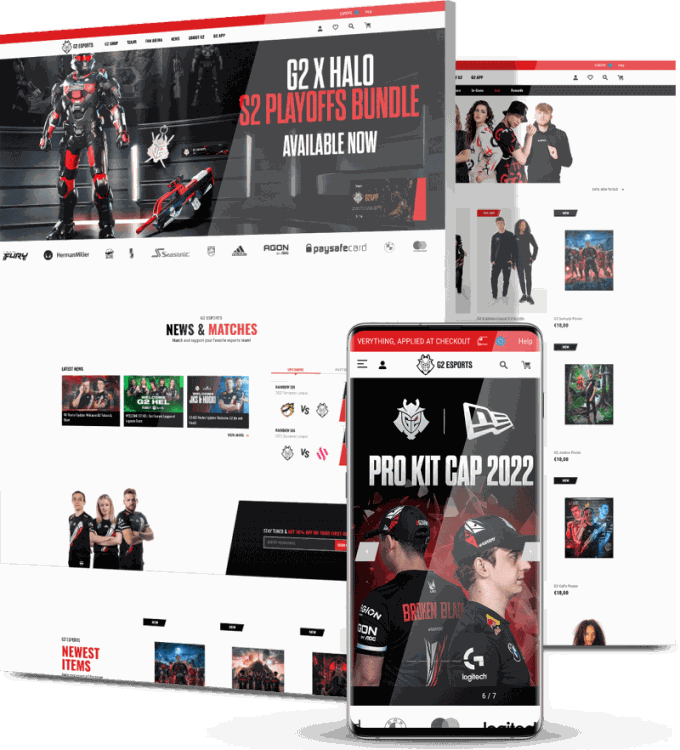
The merch shop and fan content shared one site that worked for neither audience, so we rebuilt the architecture and gave each one its own path.
We added filtering by category, type, size and price, plus wishlists and a modular hero section their team can swap out as collections turn over. The template-driven CMS we handed them means new team, player and product pages go live without a developer touching the setup.
2. ShadePro
RV owners can’t buy an awning without knowing it fits their vehicle, and our client ShadePro‘s old site left them to work that out alone.
Our team mapped a new sitemap and user flow, redesigned the interface around their core customer personas and built a custom sales configurator that recommends products based on what a shopper tells it.

Development, QA and launch all ran through us. Daily revenue climbed 155.8% within weeks of going live and the growth held after the initial spike.
Benefits Of BigCommerce Theme Customization
Theme work can feel like a cosmetic line item until you look at what it touches. U.S. eCommerce sales hit $340.2 billion in the second quarter of 2026, and the storefront is where your share of that gets won or lost. Here’s what customization gives you in practical terms.
Faster Pages And Better Core Web Vitals
Trimming unused JavaScript, sizing images correctly and moving heavy assets to a CDN cut load times measurably. Google uses those same metrics as ranking signals, so the speed work pays you twice, once in conversion rate and once in organic visibility.
A Storefront People Recognize As Yours
Stock themes look like stock themes and shoppers notice even if they can’t say why. Custom typography, color and layout give returning customers something familiar to land on, which supports repeat purchases and brand recall in a category full of look-alikes.
Higher Conversion On Your Highest-Traffic Pages
Category and product pages carry most of your revenue and small layout changes there compound fast. Moving add-to-cart above the fold, adding wallet buttons and fixing filter labels each remove a reason for someone to leave.
Content Updates Without Developer Time
Once your promo bars, banners and notices live in widgets and global regions, your marketing team edits them directly. That turns a two-day ticket into a five-minute change and frees your developer for work that actually needs code.
Room To Grow Into New Segments And Markets
Theme variations and Multi-Storefront let you serve wholesale buyers, retail shoppers and international customers from one setup. When you’re ready to open a new market, you configure a variation instead of commissioning a second website.

Customize Your BigCommerce Store With Digital Silk
We build and customize BigCommerce storefronts that maximize your conversions and visibility. Our team handles the full range, from Page Builder configuration and custom widget development through Stencil template work, performance tuning and accessibility fixes. We do all of this on staging, so your live store never takes the hit.
We start by auditing what your current theme already supports, so you’re not paying us to rebuild features you own. From there we map the customizations against your revenue pages first, then work outward.
As a full-service web design agency, we offer the following:
Our experts ensure that we:
- Take ownership of your project by using our expert knowledge to guide you through the web design process.
- Work with total transparency by being upfront with costs, timelines and recommendations.
- Deliver measurable results by providing and tracking key performance indicators (KPIs), and continuously optimizing our efforts.
Contact our team, call us today at (800) 206-9413 or fill in the Request a Quote form below to tell us about your project and start your web design journey today.
BigCommerce Theme Customization FAQs
Do I need a developer to customize a BigCommerce theme?
Not for most visual changes. Page Builder handles colors, fonts, logo sizing, banners, carousels and product counts per panel without any code, and themes like Vault expose color pickers for nearly every element.
You’ll want a developer once you need custom templates, new widgets, checkout enhancements or anything touching Handlebars and Sass files.
Will a theme update erase my customizations?
Settings you saved in Page Builder carry forward, because BigCommerce stores them separately from the theme files and keeps your custom values through a version bump.
Direct edits to template, Sass or JavaScript files are a different story and can be overwritten. Keep custom code in version control and test every update on a duplicate theme first.
Should I use Stencil or Catalyst in 2026?
Stencil is the right call for most merchants, since it powers the theme marketplace and gives you Page Builder for no-code editing.
Catalyst suits teams with React developers who want a headless Next.js storefront and full control over the frontend. If you’re still on Blueprint, migrating to Stencil should be your next project either way.
Can I use one theme across multiple storefronts?
Yes. With Multi-Storefront you manage themes through storefront-specific settings in Channel Manager, and you can apply the same theme or a different variation to each channel.
Each storefront keeps its own theme configuration, so a wholesale portal and a retail site can share one codebase while looking and behaving differently.
Is theme customization worth it for a small store?
Yes. Small stores often see the quickest return because there’s less to change. Start with the free wins inside Page Builder, then rework your mobile product page.
One focused day on navigation, image sizing and add-to-cart placement can lift conversion with no development cost at all.
What should I look for in a BigCommerce agency?
Ask for BigCommerce-specific work, not general web design. A good partner will show you Stencil template code, explain how they handle staging and theme upgrades and name the Core Web Vitals numbers they target.
Find out who owns the code afterward and how your customizations survive the next theme version.
How long does BigCommerce theme customization take?
Configuration inside Page Builder takes days. Template and styling work on a marketplace theme usually runs two to six weeks, depending on how many page types you touch.
A full custom build on the Cornerstone framework runs three to nine months once you add design, development, content migration and testing.
Can customization hurt my site speed or SEO?
It can, if nobody checks. Extra scripts, oversized images and heavy widgets all add weight, and Google treats load speed and layout stability as ranking signals.
Run Lighthouse after each batch of changes and hold the line at 2.5 seconds for Largest Contentful Paint. Done properly, customization improves both.
Tell us about your website goals and let our experts give you a custom proposal
"*" indicates required fields