Website Terminology: Key Highlights
-
Key terms shape site performance: Concepts like responsive and mobile-first design, UX/UI and analytics define how the site functions, converts and scales over time.
-
Planning defines future flexibility: How a site is scoped and discussed early determines whether it can adapt to new offerings and campaigns later.
-
Web language evolves quickly: Platform changes, UX standards and marketing practices introduce new terms that didn’t exist a few years ago.
When you greenlight a website project, you’re setting the rules for how customers find you, trust you, and decide you’re worth their time.
For 91% of businesses, the website ranks as the top marketing channel, which means a few misunderstood terms during planning calls and kickoff meetings can ripple into scope creep, rework and lost revenue.
We’ve created an easy-to-skim list of website terminology with 55 items you’re likely to come across during a custom web design project.
For easier browsing, we’ve organised them into six categories: General, Design, Development, Digital Marketing and Analytics.
General Website Terminology
In this “bucket” of website terminology, we will look at some of the most popular website terms you will most likely encounter during your project.
These are some of the terms you’ll hear us use:
1. Custom Web Design
This term refers to a website that’s created from scratch to meet the specific needs of a business or individual, without relying on pre-made themes.
It allows you to create a unique, on-brand experience that’s fully optimized for usability, search engines and conversions.
Unlike theme-based builds that force your business to fit someone else’s structure, custom web design gives you control over page logic, content flow and future expansion.
This way, it’s easier to add new offerings, campaigns or integrations without rebuilding the foundation.

2. Website Themes
A website theme is a pre-built web design template available for purchase on website platforms like WordPress or theme marketplaces like ThemeForest.
Themes can seem like a quick solution at first, but they’re built for the broadest possible audience, which often means tradeoffs behind the scenes.
As requirements get more specific, you can run into rigid layouts, bloated code, and update conflicts that limit flexibility, slow performance and turn routine changes into recurring costs rather than progress.
3. Responsive Web Design
Responsive web design (RWD) is an approach that allows a website to adapt seamlessly to different screen sizes, from desktops to tablets to smartphones.
With 65% of users expecting websites to display and work properly regardless of the device they’re using, responsiveness shapes how credibility and ease of use are judged within seconds.
From a business perspective, it influences how content is prioritized, how navigation is structured and how quickly users can complete the desired action.
In practice, responsive design is planned from the start of the design and development process, with layouts, interactions and content structures built to scale across devices without sacrificing performance or intent.
4. Mobile-First Web Design
Mobile-first web design (MFW) prioritizes the mobile user experience.
With 45.86% of all website traffic in the U.S. coming from mobile devices, that experience sets the baseline for how a site is structured and navigated.
When you design for smaller screens first, you decide what appears immediately, what follows and what prompts action within a few taps.
From there, the design scales up to larger screens while keeping the same hierarchy and momentum.
5. User Experience (UX) Design
UX design is the process of improving website usability, accessibility and overall on-site experience.
Sounds abstract, right? And it is, to a large extent.
Everything factors into user experience, from your navigation to consistency in look and feel and even button copy.
Good UX design refers to all the elements of your web design to ensure they are intuitive, valuable and engaging to the user.
6. User Interface (UI) Design
UI design covers the visual and interactive elements of a website, including layout, typography, color schemes, imagery and motion graphics.
For 50% of users, website design directly shapes how they perceive a company’s brand, setting their expectations before they read any of your messaging.
Photos and images are singled out by 40% of users as the visual elements they value most, influencing whether a site feels credible and easy to use.
When the UI is executed well, visitors can browse faster, understand what you offer with less effort and move forward without uncertainty about where to click or what to do next.
7. Usability
Usability describes how easily someone can use a website to understand what’s being offered and take the next meaningful step.
It’s reflected in navigation logic, content flow, form behavior and how the site handles detours like backtracking, changing pages, or revisiting key information.
With 88% of consumers less inclined to revisit a website after a poor experience, usability directly influences repeat visits, brand perception and revenue opportunity.
It’s the result of thoughtful UX planning, where structure and interaction align with how people browse, read and act, so your website performs as expected.
8. Functionality
Functionality refers to the features and functions on your web pages.
These can be the simplest functions, such as contact forms and subscription boxes, as well as more complex functionality, like user account sign-ins and dynamic pricing.

9. Content Management System (CMS)
A CMS is a web application that lets you publish, update, and organize website content without any coding knowledge.
It’s how all of your landing pages, articles and resources are created, revised and approved, often by multiple stakeholders over time.
With 71.4% of all websites built on a CMS and WordPress accounting for a 60.2% market share, these platforms have become the standard foundation for managing content at scale.
A well-chosen CMS supports faster publishing, cleaner governance, and long-term scalability, allowing your site to evolve as messaging, offerings and priorities change without creating dependency on developers for everyday updates.
10. User Journey
A user journey is a path that web visitors take when using a website.
It helps you visualize how to guide your user from the moment they land on your website through the key pages to the conversion point.
While each user journey is different, take a look at the five main stages that every user journey takes:

These stages show how your website should actively guide users forward, anticipating what they need at each step and making the next action feel straightforward.
11. Conversion Funnel
A conversion funnel is the series of webpages and web experiences that lead web visitors to take a desired action.
This action might be requesting a quote for a service business or purchasing an item for an eCommerce brand.
With 78% of businesses viewing conversion rates as their top website metric, the funnel defines how interest turns into action.
It highlights where confidence builds, where hesitation appears and where attention drops off, giving you a clear view of what needs refinement.
12. Navigation
Navigation refers to the subpages or menus that allow users to navigate through a website and find what they are looking for.
It’s usually used synonymously with a menu, which you’ll typically find at the header of a website or nestled behind a “hamburger” item.
For instance, Samsung uses a product-first navigation menu that reflects how customers browse, compare, and narrow options.

The menu pairs clear category labels with visual product groupings, allowing users to move from broad interest to specific products without digging through layers of links.
13. Call-To-Action (CTA)
A call-to-action is a web element, such as a button or link, that invites users to take a specific next step.
Effective CTAs are tied to context, appearing after the right information has been absorbed rather than competing for attention too early.
When message and placement are aligned, CTAs help translate interest into requests, sign-ups, purchases or calls in a way that feels natural and well-timed.
Here’s how Digital Silk uses a primary CTA to anchor the page around a single, high-intent action:

The button is placed prominently above the fold and paired with immediate context like the service offering and credibility markers, so prospects understand what they’re getting and why it’s worth taking action.
14. (Content) Headers
Content headers are the primary titles and section headlines that shape how users scan, interpret, and engage with a page.
They set expectations immediately, signal relevance and influence whether someone stays, scrolls or exits, while also helping search engines understand what the page covers.
For example, Peloton’s mobile homepage leads with “Meet You at the Starting Line,” a headline that sets tone, frames the product’s purpose, and creates motivation in a single glance.

It pairs that message with a direct CTA like “Explore Tread,” showing how the headline and next step work together to guide users deeper into the experience.
15. Body Copy
Body copy refers to the content and text used within a webpage.
This could include web page descriptions, instructions for signing up for a service or product or general web page content.
Below is an example of Rolls-Royce’s body copy, which delivers eye-catching typography with a larger font size and paragraphs that do not top three lines of copy.

16. Website Frontend
A website’s frontend is the area that can be viewed by its external visitors.
From web page design and content to navigation and functionality, a website’s frontend structure drives both user experience and user interface.
17. Website Backend
A website’s backend is the administration area of a website reserved for its developers and team members, who can enter to edit, manage and update webpages.
The backend is where you can adjust all relevant website functionalities, from straightforward data entry to complex coding.

UX/UI Web Design Terms
In this section, we’ll list frequently-used website terminology related to user experience and user interface design.
This extensive list can help you understand the role of web designers and the key elements they focus on:
18. Information Architecture
Information architecture (IA) refers to how information is organized on a website or product.
Think of it as a cookbook recipe, where ingredients are instead replaced by hierarchical webpage organization and navigational features.
19. Wireframe
A wireframe is a low-fidelity mockup of a page or product.
It’s normally the first step in the website planning process, before visual design and coding are added, in order to allow developers and clients to visualize user experience without the distraction of aesthetics.
20. Prototyping
In relation to web design, prototyping is the process of experimenting with working concepts of webpages until you land upon a final product.
This can help surface layout issues, content gaps and usability concerns early, when changes are faster and less costly to make.
These prototypes and final designs are often built using HTML and CSS.
21. Web Accessibility
Web accessibility is a set of guidelines and best practices that improve a website’s UX for people with disabilities.
Yet about 88% of websites still miss accessibility standards, often due to overlooked details like color contrast, heading structure or keyboard navigation.
Accessibility affects how people read content, browse the pages and interact with forms using screen readers, keyboards or other assistive tools.
22. Hero
The hero section is typically the first web element visitors see when they land on a web page, also known as the “above the fold” section.
Used to convey the purpose of the web page, the hero is often the most eye-catching aspect of UI.
For example, Jasper AI’s hero section leads with a direct headline that states who the product is for and what it does, then backs it up with a short supporting line that explains the operational value.

The supporting visuals add concrete cues like “Create 6,000 hyper-personalized emails within minutes” and “11x click-through rate,” giving visitors quick proof points that maximize conversions.
23. Footer
As its name suggests, a footer appears at the bottom of a web page or post.
This element can act as a directory for internal and external links, as well as containing contact information, privacy notices and/or any other important pieces of information.
24. White Space
Also referred to as negative space, white space is the empty space that appears between web elements or modules.
This element is often used in clean and minimalist designs to declutter and streamline a web page, switching undeterred focus to the elements on the screen.
25. Favicon
Favicons can be thought of as digital logo variations. They are small web icons that appear next to the title of your page in a web browser.

Not only does a favicon make it easier for someone to switch between browser tabs, but it also acts as a useful touchpoint for improving brand awareness.
26. Sticky Elements
Whether a menu or a CTA, sticky elements will follow you through a website like gum stuck to a shoe.
The sticky element will scroll alongside a website user, improving and streamlining user journeys with available navigation options while also supporting the site’s conversion funnel.
27. Animation
Animations help bring a web page to life, increasing user engagements, interactions and time on page.
While animations can come in many shapes and sizes, hover effects, page transitions, scrolling effects and dynamic visuals are among the most popular.
28. Web Styleguide
A web styleguide is a document that outlines the design principles and elements used in web design.
Just like a brand book, it includes numerous style aspects such as font sizes, colors, images and typography.
eCommerce Web Design Terms
With 92% of U.S. consumers shopping online, knowing the latest eCommerce website terminology can help you reach the right audiences at the right time.
Below you’ll find some of the most frequently used website terms in e-store design and development:
29. Shopping Cart
Acting as a basket for users as they browse through an eCommerce store, the shopping cart is the web page where customers can add products to their order and view a summary of their purchase before checking out.
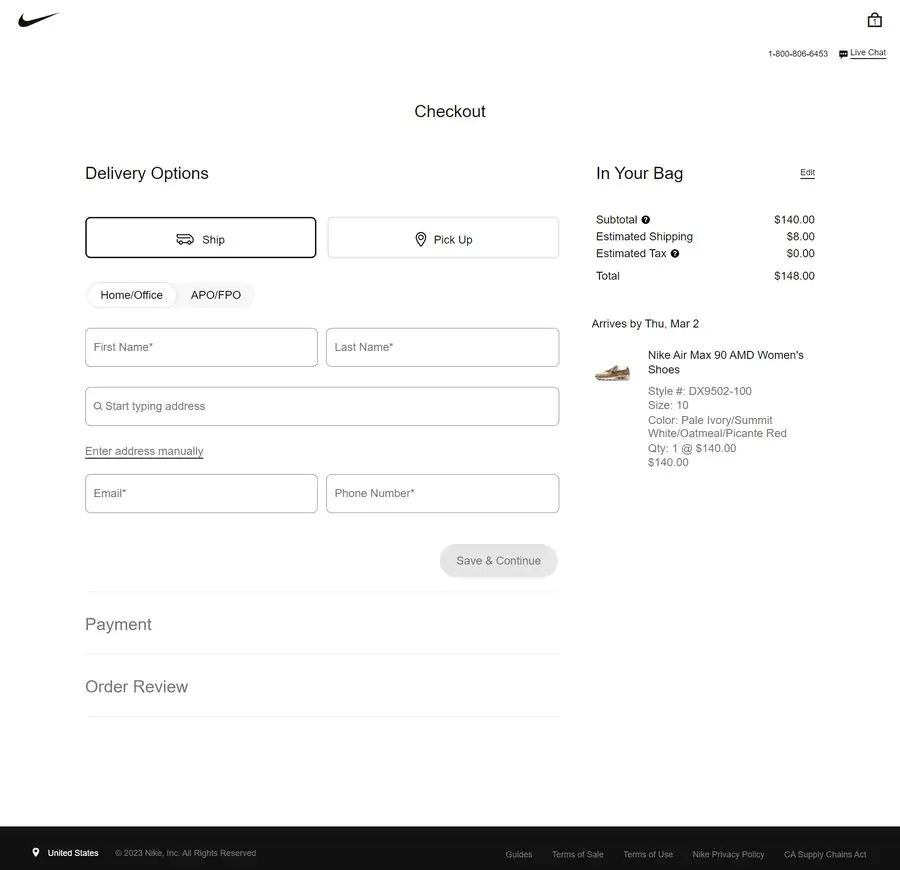
30. Checkout Pages
Checkout pages are used by customers to complete their purchase after adding items to their shopping cart.
These webpages typically include forms for collecting customer information, such as shipping address and payment information.
They can also act as touchpoints for further digital marketing activities, with newsletters and discount codes attached to email sign-up forms.
Below, you can see Nike’s checkout page in the U.S., with a minimalist design and clear input fields:
31. Payment Gateway
A payment gateway is a web service used to process customer payments by providing websites with the ability to securely accept credit card payments online.
When 35% of online shoppers abandon a cart because their preferred payment method isn’t available, the gateway becomes a direct factor in whether a sale goes through.
A well-implemented gateway supports multiple payment options, reduces checkout drop-off and reassures customers that the transaction will be handled smoothly from click to confirmation.
32. Product Pages
Product pages include detailed information about a product, such as descriptions, images and reviews.
Online stores will often use a product detail page (PDP) to provide a high-quality user experience and create conversion opportunities.
33. Product Category Pages
In terms of wider eCommerce website terminology, these pages list products belonging to a specific product category.
They typically include filters and sorting options to make it easier to find what customers are looking for, and are crucial in defining the ease of navigation of an eCommerce website.
Here’s an example of a product category page Digital Silk designed for Rollink, a collapsible luggage store:

Web Development Terms
If you are developing a custom-designed website, regardless of whether it’s on WordPress, Shopify or Magento, you should be aware of the following web development terms:
34. Frontend Development
Frontend development refers to the process of creating the customer-facing part of your website, application, software or any other digital project or solution.
Frontend developers design and implement visual elements, features and functionalities that users can interact with directly.
35. Backend Development
Backend development, or server-side development, refers to the process of creating the logic, APIs, data management, databases and functionalities.
While not user-facing, it is vital for the proper utilization of a website, application, software or any other digital solution.
Backend development deals with processes that enable the frontend to function properly and empower the user to use all the features that the website has to offer.
36. HTML/CSS
Hypertext Markup Language (HTML) is the language that web browsers use to display webpages, while Cascading Style Sheets (CSS) is responsible for styling webpages.
Below is a snapshot of what HTML and CSS can look like in practice, showing the code that structures a webpage and controls how it appears in the browser:

37. Integrations
Integrations connect your website to the other systems your business already relies on, allowing data and actions to flow between platforms.
They link forms to customer relationship management systems (CRMs), payments to accounting tools, marketing platforms to analytics, and security services to site infrastructure.
Integrations can reduce manual handoffs, improve data accuracy and make it easier to track what’s working from first click through pipeline and revenue.
38. Application Programming Interface (API)
An API is a web-based interface that allows web applications to communicate with one another.
For example, webapps can use an API to access data stored in another webapp.
This can be extremely helpful for businesses with multiple ventures, as well as data storage for digital marketing uses.
39. Web Development Methodology
Web development methodologies refer to the specific approaches web developers take when building webpages or web applications.
At Digital Silk, our web development services follow both popular industry methodologies, such as Agile and Waterfall, alongside our own tried and tested pathways to development success.

40. Agile
Agile web development is an iterative approach that focuses on dynamic and streamlined solutions that target continuous improvements.
It aims to accelerate web application development and response times to customer feedback.
41. Waterfall
More traditional than the Agile approach, Waterfall web development is the process of moving step by step within the development journey.
Aiming to complete one phase before the next begins, the Waterfall method also requires developers to plan out the entire web application before coding can begin.
42. Quality Assurance
Quality assurance is the process of ensuring webpages and web applications meet web standards.
This includes testing webpages for bugs, as well as making sure webpages are compatible with web browsers and web devices.
As websites, information and industry standards are consistently evolving, quality assurance is a crucial cog in the webpage upkeep machine.
43. Hosting
Web hosting refers to storing a website’s files and applications on a server to make it available to use on the internet.
Out of roughly 1.36 billion websites worldwide, more than 660 million are hosted globally, with about 90.5 million based in the U.S., which shows how foundational hosting is to the modern web.
Like plugging a cable into the socket, hosting is a necessary facet of a website for it to be available online.
44. Maintenance
Web developers and engineers will test a website for bugs and coding errors before it’s launched, but this is not to say that they become obsolete after this.
Maintenance is the technical process web developers use to ensure that everything remains up to date post-launch.
From routine updates to compatibility checks, ensuring a high-quality user experience is a job that requires around-the-clock attention.

Digital Marketing Terms
Digital marketing definitions also make up a section of the need-to-know website vocabulary:
45. Search Engine Optimization (SEO)
SEO is the process of optimizing a website to improve its visibility on search engines.
Organic search drives 53.3% of all website traffic, which makes search visibility one of the most consistent sources of high-intent visitors
Most clicks concentrate at the top of the results page, with 27.6% going to the first Google listing alone, so placement directly affects demand capture.
Effective SEO aligns content, structure and technical performance with how search engines evaluate relevance, helping the right pages surface when interest is already present.
46. Pay-Per-Click (PPC) Advertising
PPC advertising refers to paid advertisements that appear on search engine results pages or other websites, usually with an “Ad” or “Sponsored” tag:

Advertisers only pay when someone clicks on their ad, hence the name pay-per-click.
47. Email Marketing
Email marketing is a web-based strategy for communicating directly with customers and prospects through targeted messages.
With global email marketing revenue expected to reach $37.5 billion by 2032, it continues to attract investment because it provides direct access to audiences without relying on changing algorithms.
Email supports product launches, lifecycle messaging and follow-up after key interactions, keeping your brand present long after someone leaves the website.
48. Retargeting
Retargeting involves displaying targeted ads to web visitors who have previously visited a website.
Using tracked information to single out valuable leads, retargeting is then used as a tool to remind web visitors of the products they’ve been looking at.

Web Analytics Terms
Web analytics tends to introduce some of the more technical website terminology, but it canhelp you understand what’s actually happening on your website:
49. Google Analytics
Google Analytics is a free-to-use web analytics tool that tracks a range of insights, such as how users find a website and what they do once on the site.
For example, online store owners can see data about revenues and customer demographics, while blog managers can track page views, user engagement and more.

[Source: Google Support]
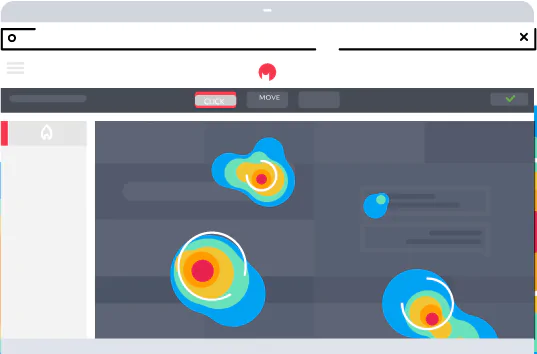
50. Heatmaps
Heatmaps help to visualize web page activity by highlighting where users click and how far they scroll on a page by tracking their movement and engagement patterns.
By using tools like Hotjar, VWO and Microsoft Clarity, it becomes much easier to spot key areas for optimization and improvement on a website.
51. Website Traffic
Website traffic relates to the number of web visitors that visit a web page.
These visits are also referred to as sessions and are an indicator of how effective a website is at attracting an audience.
52. Conversion Rate
The conversion rate is the percentage of web visitors who take a desired action, such as signing up for an email list or making a purchase.
Monitoring conversion rates can provide insights into which webpages are performing well and indicate which wider strategies are effective.
Need to calculate your conversion rate? Use the formula below:
Conversion Rate = (Total Conversions / Total Website Visits) x 100
53. Engagement Rate
Engagement rate is the percentage of web visitors who are actively engaged with a web page.
This can include things like reading content and interacting with web elements, such as web forms and navigation menus.
By replacing dry and unattractive UX and UI with original and entertaining features, designers and developers can increase engagement and in turn brand visibility.
Need to calculate your engagement rate? Use the formula below:
Engagement Rate = (Total Engagements / Total Impressions) x 100
54. Bounce Rate
Bounce rate is the percentage of web visitors who leave a web page without taking any action.
A web page that does not convert any users toward the desired action adds no value to its owner.
So, a high bounce rate can often indicate your site needs to be optimized or your strategy needs to be adjusted.
On average, the bounce rate on desktop is slightly lower than on mobile, coming in at 47.3%.
Need to calculate your bounce rate? Use the formula below:
Bounce Rate = (Total One-Page Visits / Total Page Visits) x 100
55. A/B Testing
A/B testing is a web-based strategy used to compare the performance of two different versions of content.
Almost like a social experiment where two sets of pills are given to the participants, A/B testing involves creating two versions of webpages or web elements, such as web forms and navigation menus, to determine which version performs better.
Partner With Digital Silk To Grow Your Brand Online
While you won’t be expected to act as an all-knowing encyclopedia, understanding the essentials is a great way to ensure smooth interactions and achieve your expectations.
Collaborating with Digital Silk means gaining access to a team of experienced designers and developers, a dedicated digital strategist and all the latest tools and techniques.
Whether an end-to-end custom website design or a small-scale website refresh, we create digital solutions that drive traffic, engagement, and conversions.
As a full-service web design company, our solutions include:
- Custom web design
- Redesign services
- Custom web development
- Performance-driven branding services
- Digital marketing
Contact our team, call us at (800) 206-9413 or fill in the Request a Quote form below to schedule a consultation.
"*" indicates required fields