
Website Planning In 2026: 14 Steps For High-Performing Sites
A website can look polished and still quietly lose visitors' trust. Explore our 14-step website planning guide to build a site that's strategic, secure and built to perform from day one.


-
Planning shapes performance early: Security, structure and user journeys are decided before design begins and they determine how the site performs long after launch.
-
Discovery and trust are changing: AI-driven referrals, identity-based threats and higher expectations mean websites must work for people and systems at the same time.
-
Ownership prevents drift: Clear goals, measurement and post-launch governance keep websites focused, reliable and aligned as priorities shift.
A website can look polished and still quietly lose trust.
IBM reports that the average cost of a data breach reached $4.4 million globally in 2025, while Microsoft now blocks 7,000 password attacks every second, driven by a sharp rise in identity-based threats.
At the same time, Adobe found that AI-driven referral traffic grew more than tenfold between mid-2024 and early 2025, changing how people arrive on websites and what they expect to find once they do.
These shifts make website planning the stage when security assumptions are addressed, content is structured for both people and machines and user journeys are shaped before friction creeps in.
This guide walks through how to approach website planning with clarity, so the final site feels intentional, resilient and built to perform from day one.
14 Steps To Website Planning
Effective website planning follows a clear sequence.
Each step informs the next and skipping ahead usually shows up later as rework, delays or missed expectations.
The steps below reflect how high-performing websites are planned today.

1. Start With Your Goals & Key Performance Indicators (KPIs)
Every website project starts with goals. The difference is whether those goals are useful.
Broad statements like “increase leads” or “improve engagement” don’t give teams much to work with.
Clear goals describe what should change after launch and how that change will be measured.
They create shared direction across strategy, content, design and development.
KPIs should also be defined at this stage.
Too many websites launch without reliable analytics or agreement on what leadership expects to see. When reporting feels inconsistent or incomplete, confidence in the website disappears quickly.
IBM’s 2025 findings offer a clear parallel. Alongside the $4.4M average breach cost, the report shows that 63% of organizations lack formal AI governance and 97% have experienced AI-related incidents without proper access controls.
These problems usually start with unclear ownership and missing rules.
That lack of clarity often shows up in inconsistent reporting or metrics no one fully trusts.
If you already have a functioning website, review its current performance and identify areas for improvement.
Write down specific SMART goals, i.e. Specific, Measurable, Attainable, Relevant and Timely.
These goals might include:
- Generating more traffic
- Generating leads
- Boosting online sales
- Decreasing your bounce rate
- Increasing your mail subscribers
- Improving customer satisfaction
- Improving conversion rate
KPIs to measure the success of your goals might include:
- Organic traffic
- Traffic by source
- Search rankings
- Dwell time
- Interactions per visit
Once you have specific goals laid out and metrics to determine how to measure their success, you can start strategizing actionable ways to achieve them.
2. Define Your User Personas
Personas are most effective when they explain behavior, not demographics.
Instead of fictional backstories, focus on why someone visits the site, what makes them hesitate and what helps them move forward.
The goal is to understand intent, objections, trust signals and information needs.
This becomes especially important for websites that aim to reduce friction or support self-service. Gartner reported in 2024 that only 14% of customer issues are fully resolved through self-service, largely because content and structure fail to match how people actually seek answers.
To make personas useful during website planning, tie them directly to decisions.
Each primary persona should:
- Inform what content appears on key pages
- How information is grouped
- Which CTAs feel appropriate
- How much reassurance is needed before asking users to act
When personas are applied this way, they stop being reference slides and start shaping navigation, messaging and conversion paths.
That alignment needs to happen early, before navigation and content decisions are locked in.
3. Analyze Your Direct Competitors
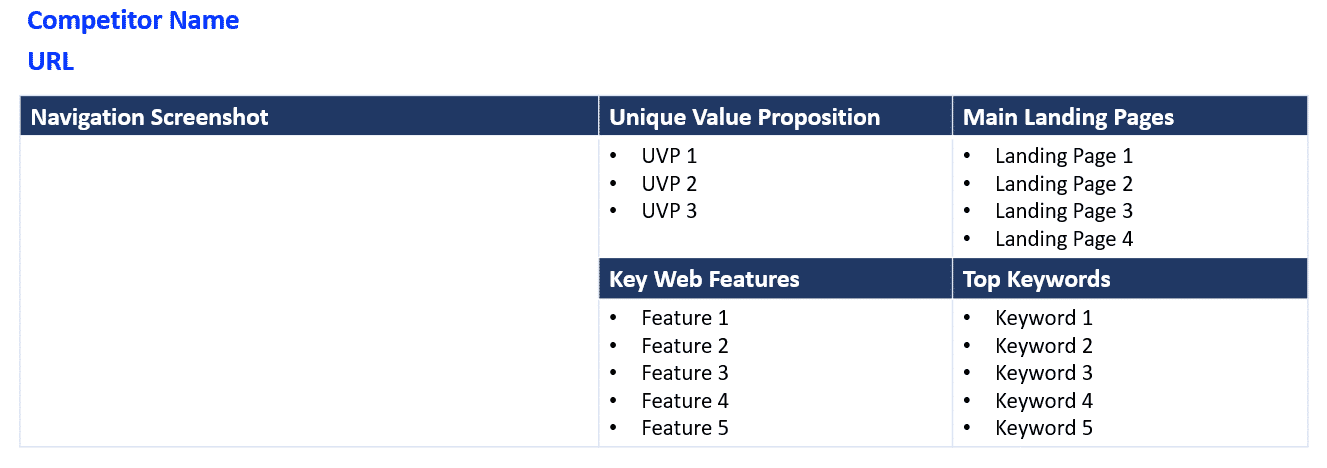
List and carefully analyze between two and five of your top competitors. Look beyond their user interface and review their:
- Sitemap
- Content strategy
- Messaging
- Key landing pages
- SEO efforts (use tools such as SEOMinion and Ahrefs to observe title tags, meta descriptions, image titles and more)
The purpose of this task is to research your competitors’ strengths and weaknesses compared to your own, find a gap in the market and optimize your business strategy.
Discuss your competitors’ offerings, how they differ from yours, what makes them stand out and be liked by customers.
4. Plan SEO As Structure
SEO planning should shape how a website is built, not just how pages are labeled.
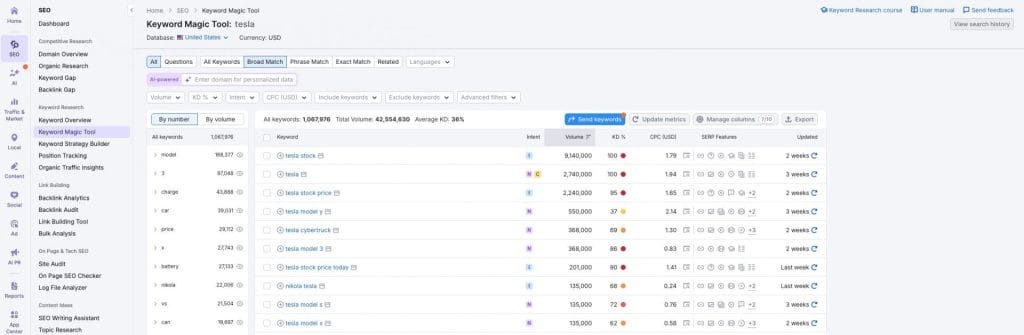
Keyword research should inform the sitemap, page hierarchy and internal linking strategy.
It should also clarify what your audience is looking for, what terms they’re using to look for your services and what type of information they want to find on these service pages.
You can use tools such as SEMrush and Ahrefs to find viable keywords for your site.
For redesigns, SEO planning must include content migration and redirects.
Rankings are rarely lost because search engines “get confused.” They’re lost because valuable pages disappear, URLs change without redirects or content no longer matches intent.
Verizon’s 2024 Data Breach Investigations Report offers a useful comparison. It found that vulnerability exploitation increased by 180% and 68% of breaches involved non-malicious human error.
Planning gaps are often where damage begins.
5. Create A Sitemap That Reflects Real Priorities
The sitemap is where planning stops being abstract and starts taking shape.
At this stage, goals, personas, SEO insights and competitive research should already be clear enough to answer a simple question: which pages actually need to exist and which ones matter most?
A strong sitemap reflects user intent.
It prioritizes pages based on what people are trying to accomplish and how they move through the site, rather than on internal team structure.
This is also where many websites go wrong.
Too many pages dilute focus. Too few create dead ends.
A well-planned sitemap reflects how users think and anticipates growth, leaving room for new content or features without forcing a full navigation rethink six months later.
Sitemaps also play a quiet role in search performance.
Clear hierarchy helps search engines understand which pages matter most and how content relates across the site.
When the structure is vague or overly flat, important pages often struggle to gain visibility even when the content itself is strong.
Once the sitemap is agreed on, it becomes a reference point for everything that follows.
User journeys map cleanly onto it. Content planning gains boundaries. Design decisions stop being subjective.
At that point, the sitemap is the backbone of the website.

6. Map Out User Journeys That Reflect Real Behavior
User journeys are rarely linear.
People land on individual pages from search, skim for reassurance, open multiple tabs, leave and return days later.
Planning should support that behavior instead of forcing everyone into a single path.
That means thoughtful internal linking, CTAs that fit the page context and content that answers questions in a natural sequence.
Content now needs to be structured so it’s understandable to users and interpretable by systems that summarize and route information.
7. Audit Existing Content To Inform Page Strategy
This step often determines whether a website feels focused or fragmented once it goes live.
Before design begins, review your existing content and decide how it should support the future site.
That means identifying which pages belong at the center of your strategy, which ones need refinement and which no longer align with how users search, browse or convert.
Too many sites launch with content decisions made too late and it shows.
More than 53% of all visits come from search engines, confirming that content is a primary way users discover and interact with sites.
This underscores how critical it is to plan and optimize your most important pages early, rather than patch them together after launch.
Waiting until design to decide content also increases risk.
Research suggests that updating and republishing old content, which is a direct outcome of good content auditing, can increase organic traffic by as much as 106%. This is a clear payoff for investing time in content decisions before design and development.
A content audit doesn’t just clean up what you already have. It exposes where the site is already performing, where it is underperforming and where meaningful gaps exist, such as missing proof points, unclear explanations or unanswered objections that stop users in their tracks.
Those insights should directly inform which pages are prioritized in your sitemap and how landing pages are structured.
When content decisions are made at this stage, landing pages are built on evidence, aligned with what real audiences look for and supported by content that already carries authority.
8. Write Page Briefs Before Design Starts
Design can’t compensate for unclear messaging.
Before wireframes, define what each key page needs to accomplish, who it serves, what objections it must address and what action it should encourage.
Page briefs give designers and writers a shared point of reference, helping prevent misalignment once visual work begins.
This matters because people don’t read web content the way they might a printed page.
Eye-tracking research from usability experts shows that most visitors scan pages instead of reading every word and only a small minority read content word-by-word.
That means your strongest messages need to be easy to find and immediately relevant to the visitor’s intent.
When page intent isn’t clear from the start, design iterations often try to “fix messaging” visually, which rarely works and usually adds time.
Creating briefs early keeps messaging decisions out of design and rooted in purpose.
9. Create A Design Brief To Align Visual Direction
Once page intent and content priorities are clear, the next step is defining how those ideas should be expressed visually.
A design brief translates strategy into constraints designers can work within.
It should include your brand style guide to ensure the designer accurately translates your visual identity to your website.
Details to add to your design brief include:
- Logo variants and guidelines
- Color palette
- Typography
- Iconography
- Image treatment
Your design brief should also include references to the special design elements you’d like to feature on your website, such as:
- Modules
- Roll-over effects
- Forms
Without a design brief, visual decisions often become subjective.
But when expectations are documented upfront, designers can focus on solving the right problems instead of guessing what “on brand” means.
Visual consistency helps users understand and navigate interfaces more easily.
A clear design brief ensures the website looks cohesive, supports content hierarchy and reinforces trust.

10. Plan Accessibility & Compliance As Part Of Structure
Accessibility rarely fails because teams don’t care. It fails because it’s treated as something to “check” once the design is finished.
In 2026, that approach creates real risk.
Regulations such as the European Accessibility Act and ongoing ADA enforcement mean accessibility affects who can legally use your site, who can buy from you and who can exclude you from procurement entirely.
Planning for accessibility early changes better decisions later.
It influences:
- How navigation is structured
- How content hierarchy is expressed
- How forms, modals and interactive elements behave
- How contrast, typography and motion are handled
It also improves usability for everyone.
Clear labels, predictable flows and readable layouts reduce friction for users on mobile, users scanning quickly and users relying on assistive tools.
When accessibility is considered during planning, teams avoid late-stage compromises where designs are adjusted under pressure or features are removed entirely.
11. Account For AI Use On Both Sides
AI is already influencing how teams work and how users browse.
75% of global knowledge workers are using AI at work, which has direct implications for content creation, review workflows and governance.
Without planning, AI use can introduce inconsistencies in tone, duplicate messaging or expose sensitive information through ungoverned tools.
Website planning is the right moment to define clear boundaries: where AI can assist, where human review is required and how brand voice and data are protected across pages.
Accounting for these decisions early helps teams move faster later, without sacrificing clarity, consistency or trust.
Planning matters even more when AI becomes part of the site itself. In our web development work for Unity Environmental University, we helped deploy Salesforce Agentforce, the first implementation at a U.S. institution.
12. Define Technical, Security & Integration Requirements Early
If a website connects to a CRM, includes logins, processes forms or integrates with other systems, those requirements should be clear before design begins.
These decisions influence structure, page flows and even content placement, not just what happens behind the scenes.
Microsoft reports a fourfold increase in Distributed Denial-of-Service (DDoS) mitigations year over year, reinforcing that identity and availability are no longer edge concerns for modern websites.
Addressing technical and security requirements during website planning helps teams avoid late-stage compromises, where designs need to be reworked or features scaled back to fit technical realities.
When constraints are understood early, design and development move forward with fewer surprises and far less friction.
13. Plan Measurement, Reporting & Ongoing Review Before Launch
A website launch is the point where accountability begins.
Too many teams agree on goals and KPIs early, then leave measurement details vague until after launch.
That gap leads to reports that feel incomplete, numbers that don’t line up across tools and quiet doubts about whether the website is actually doing its job.
Planning is the moment to decide how performance will be tracked, reviewed and acted on.
That includes defining:
- Which events truly matter beyond pageviews
- How conversions are attributed across channels
- What dashboards leadership will review and how often
- Who is responsible for acting on performance signals
This step has become more important as traffic sources fragment.
With AI-driven referrals, zero-click journeys and privacy changes limiting traditional attribution, clean tracking and clear interpretation matter more than raw volume.
A spike in traffic means little if no one agrees on what “good” looks like or how underperformance will be addressed.
Websites that improve over time tend to share one trait: someone is accountable for reviewing data, asking hard questions and adjusting pages based on real behavior.
14. Close Planning With Budget, Scope & Ownership
A budget sets boundaries, but ownership sustains performance.
Before moving into design, align on what’s in scope, what’s deferred and who owns the website after launch.
Without clear ownership, even strong websites degrade over time through unstructured updates, inconsistent content and ad hoc changes that chip away at performance.
The cost of a website will always depend on its requirements. Planning is where those requirements are defined clearly enough to avoid surprises later.
When determining your budget, consider:
- The primary purpose of the website, such as lead generation, advertising or software integration
- Whether a template-based approach is sufficient or a custom design is required
- The features and functionality the site must support at launch
- Which agencies are best suited to your needs and budget, and how transparently expectations are discussed
Platform choice also belongs in this conversation.
If you opt for a templated website, selecting the right content management system affects how easily the site can be maintained, updated and governed over time. Platforms such as WordPress or Magento each come with different trade-offs in flexibility, ownership and long-term upkeep.
Addressing budget, scope and ownership together helps ensure the website is both launched successfully and managed intentionally long after it goes live.
When One Planning Process Doesn’t Fit Every Website
Not all websites are planned the same way and treating them as interchangeable creates blind spots.
A marketing site focused on awareness has different priorities than a lead generation site tied to sales pipelines.
A logged-in portal or platform introduces security, performance and content challenges that simple sites never face.
Planning should reflect the role the website plays in the business.
That means adjusting focus across:
- Content depth versus speed to action
- Public discovery versus authenticated journeys
- Conversion paths versus ongoing usage
- Editorial governance versus product ownership
Acknowledging these differences early helps teams avoid mismatched expectations later.
It also ensures the planning process supports how the website will actually be used rather than how it looks in a sitemap.
6 Mistakes To Avoid When Planning A Website
Planning a new website often starts with good intentions, but many projects still stumble in the same places.
Those missteps are more costly than ever because expectations around speed, clarity and accountability are higher across the board.
Below are the most common website planning mistakes teams continue to make, along with why they matter now.
1. Treating User Personas As A Formality
Many teams create personas and then stop using them.
When persona research doesn’t actively influence sitemap decisions, content hierarchy or page priorities, the website ends up reflecting internal assumptions rather than real user behavior.
The result is a site that looks polished but feels disconnected from how people actually search, scan and decide.
2. Letting Content Decisions Happen Too Late
Content is still too often treated as something to “fit into” designs.
When content isn’t reviewed, prioritized and planned early, pages become cluttered, key messages get diluted and high-value information is buried.
In 2026, where users frequently land directly on individual pages from search or AI-driven summaries, unclear or overloaded content leads to fast exits.
3. Designing Navigation Around Internal Structure
Complex navigation remains one of the most persistent planning failures.
Sites organized around departments, services or internal language force users to decode the structure instead of moving naturally through it.
Overcomplicated navigation increases friction and quietly undermines conversion, even when the design itself looks clean.
4. Treating CTAs As Decoration Instead Of Direction
Calls to action still get added as visual elements rather than planned as part of the user journey.
When CTAs aren’t clear, contextual or aligned with user intent, visitors hesitate.
Effective CTAs guide users forward without pressure, offering clear next steps instead of demanding commitment too early.
5. Planning SEO Too Late In The Process
SEO is still often treated as a final checklist instead of a structural input.
When keyword intent, page hierarchy and internal linking aren’t considered during planning, teams risk losing visibility during redesigns or launching pages that don’t align with how people actually search.
By the time issues surface, fixes are far more disruptive.
6. Ignoring Governance & Ownership After Launch
One mistake competitors rarely address is what happens after launch.
Without clear ownership, update processes and decision rules, even well-planned websites degrade over time.
Content becomes inconsistent, pages multiply without purpose and performance slips, which is why planning must account for how the site will be managed.
Build Your Website With Digital Silk
The websites that perform best are well-planned.
They are built on clear goals, structured content, measurable journeys and governance models that keep performance from eroding after launch.
They account for security, AI-driven discovery, accessibility and long-term ownership before visual decisions are made.
That level of discipline requires a partner who understands how strategy, design, technology and performance intersect in real business environments.
Digital Silk helps mid-to-large companies plan, build and evolve digital experiences that are resilient, measurable and aligned with how people discover and trust brands today.
As an award-winning premium web design agency, Digital Silk delivers:
- Digital strategy and transformation consulting
- Enterprise website design and custom development
- SEO for competitive national and global markets
- Data-driven PPC and performance marketing
- Premium brand solutions and visual identity systems
- UX optimization and conversion-focused redesigns
- Custom platforms, integrations and scalable architectures
If you’re planning a new website, our team can help you turn planning decisions into long-term performance.
Contact our team, call us at (800) 206-9413 or fill in the Request a Quote form below to schedule a consultation.
Tell us about your goals and let our experts give you recommendations and a custom proposal
"*" indicates required fields